
Pixel GenImage Style tuning w/ LoRA (Low-Rank Adaptation)
What this is?
This project explores the power of using the LoRA (Low-Rank Adaptation) technique to fine-tune the outputs of an image model, specifically Stable Diffusion XL and wrap it in a simple front-end experience. Although this project focuses on tuning an image model, this technique can be applied to any generative model that is based on matrix multiplication (LLMs, etc.). What this is not This is not an exercise in the ability of modern coding agents or frontier models.
Why LoRA
The development of open-weight models has enabled people to begin tailoring generative models to specific use cases for individuals and organizations.
In the case of Stable Diffusion XL, it is beneficial to have access to tune 3.5 billion parameters. However, for many, this is an unrealistic number of parameters to adjust due to hardware requirements, time, and the cost outweighing the benefits of the project. An extensive field of lightweight methods exists to customize models; this project focuses on LoRA.
With LoRA, we essentially freeze the weights of the large pre-trained model (Stable Diffusion XL) and introduce a smaller trainable matrix, which serves as the Low-Rank Adaptation. During training the weights of the LoRA adapters are the only ones being updated, while the larger model weights remain fixed and untouched.
Diffusion Models
A quick overview of diffusion models: they take images from a training dataset and add noise to them in small incremental steps. Learning occurs as the model predicts how much noise has been added to the image; this prediction is then compared with the true value of the noise added, and the model's internal weights are adjusted based on this loss.
When it comes to inference / generating a new image After the model is trained, it has become an expert in removing noise, the model begins this process with a canvas full of noise and through many steps the noise is removed resulting in the final image which is directed by the text prompt.
This is an oversimplified explanation of how diffusion models work; if you are interested, this video does a great job of further explaining.
Training
The Unstonio Pixel art data set was used to train the weights to achieve the pixel art styling. As mentioned before, this approach will work with any dataset of images to achieve results in a different style.
In theory, I could have performed the training on my M3 Mac, however, to avoid unneeded headaches, a single NVIDIA RTX A6000 GPU was used for the training runs. Although not considered a consumer-level GPU, it is obtainable at a cost of ~$4.5k, an even more obtainable option is renting one for $0.35 an hour.
Inference / Image Generation
To generate a new image with the trained LoRA adapter, a model pipeline is created for this case with the Hugging Face Diffusers library where the base Stable Diffusion XL model is loaded into the pipeline, after which our custom-trained LoRA adapter weights (as a .safetensors file) are injected into the base model. This allows the large pretrained base model with its frozen weights to do the heavy lifting of the image creation, while the light LoRA adapter steers the model into the desired style.
Using a simple front-end web interface, a user enters a text prompt a JavaScript fetch request then sends this to the locally-run backend managing the model pipeline. Once the model completes the image generation, the result is sent to the front-end for review. In this demo, all inference was performed locally on an M-series MacBook Pro, which was able to generate an image in approximately 45 seconds.
One might ask why go through this process if one can ask any image-generating model to “create an image in the style of pixel art.” If you only need to generate a single image, that would be a valid question, and all this work would be a waste of time. However, processes like this create a reusable component that can maintain visual consistency across many outputs.
Dataset Consideration
It would be dishonest to not mention the importance of the quality of the training dataset, quality is dictated by a set of diverse images that are properly annotated describing what is in the image (not style). The unstonio PixelGPT dataset used in this previous section, I would argue, is unrealistically perfect as it contains 20,000 images with good annotations.
To apply the LoRA technique to a more realistic situation, where the perfect training dataset is not available for free download. To test this I repeated the above process with a dataset I collected and prepared
Extension: Transforms (80’s Cartoons)
Inspired by my love of pinball and recent playing of Stern's new Transformers title (check it out), I wanted to see if the LoRA technique could produce consistent images in the style of the 1984 Transformers cartoon.
70 images were collected from the original cartoon. When collecting images, the focus needs to be on diverse, somewhat basic images (people, objects, landscapes, etc.); in fact, there were no images of the actual Transformers in the dataset.
To demonstrate practicality, I did not hand-annotate the images, as I want to demonstrate how this approach can be done by an individual or a small team, a detailed system prompt was used in combination with a lightweight local LLM for the annotation.
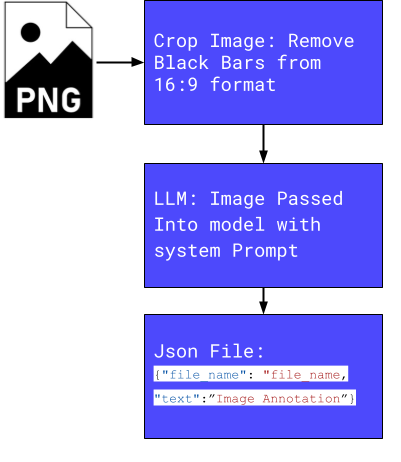
I want to emphasize that the purpose of these examples is not to demonstrate ways to cut creative corners or suggest artists can now be removed from the process. It is to show large open weight generative models can be fine-tuned with lightweight adapters to achieve a desired outcome, for your project needs. It goes without saying I don't have the rights to images used and this is for research purposes only.